
PROXYMA Blog

Proxy servers help us protect our privacy and browse the web securely. Many people use proxy servers to access restricted content or to hide their real IP address. In some cases, using a proxy server can also increase connection speed.
GeeLark is a browser that supports proxy settings for 100% private browsing. When used in conjunction with the proxy server proxyma, GeeLark becomes more reliable and faster. GeeLark simplifies setting up and managing proxy servers. To avoid problems, it’s important to know the correct settings. This step-by-step guide will tell you everything you need to know.
Known as the fastest and most reliable proxies, Proxyma’s solutions are suitable for a variety of industries, including data collection, e-commerce analytics, ad verification, and cryptocurrency trading. Their high-quality proxies are ethically sourced with user consent and distributed worldwide, ensuring seamless operation and a high level of privacy for all digital transactions. Whether it’s geotargeting, IP rotation, or detection evasion, Proxyma proxies deliver unrivaled reliability and speed.
Choose Proxyma for:
IP addresses of real people for maximum privacy
The best proxy server pool on the market for optimal performance
High-quality proxy servers designed for seamless integration
Enterprise-grade performance with 99% uptime and advanced detection protection features.
What is the GeeLark browser?
GeeLark is a user-friendly web browser that boasts high speed and privacy. Proxy settings can be quickly changed. The browser supports several proxy types, such as HTTP, HTTPS, and SOCKS5. It is fully compatible with all devices, including Windows, macOS, and Android.
GeeLark’s biggest advantage is its user interface and white background for improved visibility. GeeLark focuses on performance rather than superior functionality. GeeLark never collects user data for advertising.
The browser also supports user scripts and extensions for Chrome, Firefox, and Opera. A built-in ad blocker speeds up page loading, ensuring a clean and uncluttered web browsing experience for every user.
Key Features of the GeeLark Browser
GeeLark loads webpages faster, regardless of connection type. Built-in privacy settings block unwanted ads. You can customize the browser with various themes.
The browser operates with very low system resource consumption and offers powerful features even on older computers with limited RAM. Private browsing mode does not save history or cookies, so if you plan to use multiple proxies, GeeLark is a good choice.
Steps to set up a Proxyma.io proxy in the GeeLark browser
Download the GeeLark Antidetect browser from the official website. Then open and run the EXE file on your computer. You’ll see the following option:
One-click installation
Continue with the installation.

2. Once the installation is complete, a login screen will appear. Click **Register Now** to create a new account.

3. Enter your email address to receive a one-time code to verify your email address. Then, set a password for your GeeLark account and click **Login** to complete the setup.
4. You will now see the main page with all available features. Use the menu options on the left side of the screen to create a new profile.

5. Click Create Custom and enter the basic information such as name, group, operating system, proxy, etc. Then click OK.

6. Now select the proxy you want to connect to. Click “Proxy” on the left. Then click “Add Proxy.”

Get unlimited proxy servers at proxyma.io
7. Go to the website https://cabinet.proxyma.io/en/login and create an account.

8. The “Create proxy pool” option will appear at the top of the screen. Filter proxy locations based on the IP address you want to connect to.

9. All available proxy settings will be displayed. Then, 10 proxy sets will automatically appear on the screen.
10. Select the desired option and click **Copy proxy list**.

Configure the necessary proxies
11. Paste the proxy list into the empty field to the right of GeeLark. Proxyma.io details will be automatically detected. Click **ОК**.

12. Now you will see a list of 20 proxy servers on the screen.

13. Go to the “Saved Proxies” section and select the proxy you want to connect to your profile.
14. Click the “Start” button and you’re done. You’ll now automatically connect to this IP address.
GeeLark is the first mobile anti-detection app that completely changes the rules of the game. Instead of simply imitating web browsers and mobile browsers like traditional anti-detection browsers, GeeLark goes even further by imitating mobile phones, allowing you to run mobile apps.

Why use proxyma.io proxy in GeeLark?
proxyma.io proxies have a higher success rate than many other proxy providers. Their request success rate is 99.8%, minimizing browsing errors. These proxies can help users bypass geographic restrictions that may block content in a specific region.

They also offer 99.99% uptime, ensuring uninterrupted web browsing. Proxyma.io’s high uptime rate is ideal for users who require a stable connection.
95% clean IP addresses reduce the chances of websites blocking or flagging your activity, ensuring a smooth web browsing experience.
Proxyma.io Pricing Review
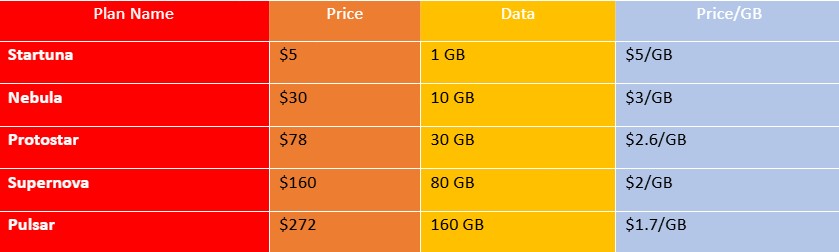
✔ Includes over 1000 simultaneous ports.
✔ IP address rotation worldwide.
✔ Compatibility with HTTP, HTTPS, SOCKS5.
SP Proxy Plans (Unlimited Bandwidth)
✔ Ideal for enterprise accounts and billing platforms.
✔ Real IP addresses, no traffic restrictions, ultra-low detection rate.
✔ Available upon request from the Proxyma.io sales department.
Try it risk-free
Get started with Proxyma’s Startuna package:
Only $5 for 1GB.
Additional test plan for $2.50.
Additional traffic is available at reduced prices for new users.
Conclusion
Setting up a proxyma.io proxy in GeeLark is very simple. The browser works seamlessly with these proxies, ensuring private and fast web browsing. GeeLark is designed for simple and effective proxy settings management. With proper configuration, you can enjoy a secure and fast internet. For those who value privacy and speed equally, GeeLark and proxyma.io are the perfect combination.
Looking for a specific article?
Available categories





